Workshop
Resource Hub
Everything you need to build AI-powered landing pages and 3D visuals — tools, templates, prompts, and the full workflow.
The Full Flow
Token-optimised. Each step feeds the next. No wasted effort.
Your Tools
Get these ready before the workshop. Most are free.
ChatGPT
FreeBrainstorm ideas. Create your brief. Generate the video prompt for Google Flow.
Open ChatGPT→Google Flow
FreeGenerate a 6-second loopable background video. Minimal, cinematic, atmospheric.
Open Google Flow→Cloudinary
Free tierHost your videos and images. Upload → get a public URL. CDN delivery built-in.
Sign up free→Lovable
Free tierAI design tool. Feed it your prompt, reference, and video URL. Generates your design system.
Open Lovable→Claude Pro
$20/moAI thinking partner. Includes Claude Code for local preview and fine-tuning. The only paid tool.
Subscribe→Claude Code
Included w/ ProTerminal agent. Import Lovable's export, preview locally, fine-tune with sliders.
Download→The Detailed Guide
Brainstorm with ChatGPT
Start with ChatGPT (free). Tell it your rough idea and let it help you shape a clear brief. You can also use Claude — whichever you prefer.
The output of this step is a structured brief — not a vague idea.
Fill the Brief Template
Think through these before you touch any design tool. This is what separates intentional design from AI slop.
Pick a Design Reference
A reference anchors the AI. Without one, you get generic output.
Create Your Loop Video in Google Flow
Use ChatGPT to write a video prompt, then generate it in Google Flow. The trick: upload the same image as both start and end frame — this forces a seamless loop and saves you tokens.
// Paste into ChatGPT to get your Google Flow prompt

I need a prompt for Google Flow to create a
6-second loopable video for a website background.

My project: [YOUR PROJECT NAME]
Visual direction: [DARK/LIGHT/CINEMATIC/MINIMAL]
Subject: [WHAT THE VIDEO SHOWS]

Make it minimal, atmospheric, and seamlessly
loopable. No text, no people, just ambient motion.
Google Flow Settings — configure these exactly:
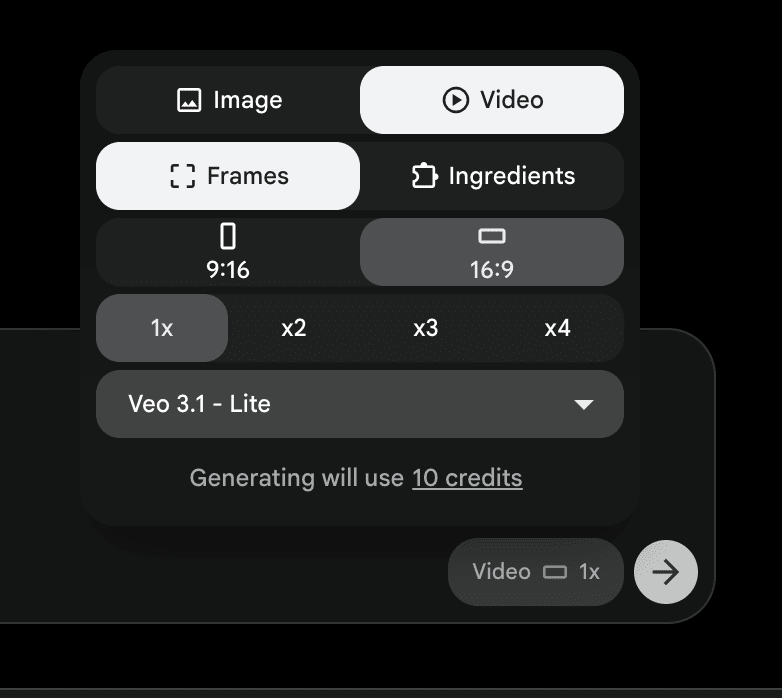
- Write your prompt — use ChatGPT to craft it (template above)
- Open Google Flow — switch to Video → Frames
- Select Veo 3.1 - Lite from the model dropdown (10 credits per gen)
- Upload your start & end frame — use the same image for both to force a loop
- Set 16:9, 1x — landscape ratio, single generation to save credits
- Generate — download the result when done
Upload to Cloudinary
Now take your video and host it on Cloudinary so you get a public CDN URL to use in your design.
- Log into Cloudinary — go to the Media Library tab
- Drag & drop your video — or click Upload in the top-right
- Copy the public URL — click on the uploaded file, copy the URL. This goes directly into your Lovable prompt next.
Build in Lovable
Combine everything — brief, copy, Cloudinary video URL, and sidqo.com as reference.
I'm building a header for [PROJECT NAME]
— [brief one-line description].

Use sidqo.com as the design reference
for layout, spacing, and overall feel.

Background video (Cloudinary URL):
[PASTE YOUR CLOUDINARY URL HERE]

Dark gradient overlay from the bottom.
Headline: "[YOUR HEADLINE]"
Sub-headline: "[YOUR SUB-HEADLINE]"
CTA: "[YOUR BUTTON TEXT]"

Must be responsive — mobile, tablet, desktop.
Prioritize mobile-first.
Iterate until the design system feels right. Then export the .md file with the full code.
Claude Code → Fine-Tune → Ship
Import the .md from Lovable. Preview locally. Use the magic prompt to get interactive sliders.
- Create a project folder in Documents — name it after your project
- Open Claude Code and import the .md file
- Preview at localhost:3000 — preview button in top-right corner
- Use the magic prompt below to get interactive controls
Show me all the things I can tweak here.
Give me sliders for gradient intensity, blur level,
gradient direction, start color, end color,
and positioning.
Let me adjust them live and lock in the values.
Drag sliders → find the sweet spot → lock values → tell Claude to make them permanent. Done.
All Prompts
Copy-paste ready. Bookmarkable.
Create a 3D wireframe visualization of [BUILDING].
Dynamic camera: slow orbit, multiple angles.
Start eye-level, gradually rise to bird's eye.

Theme: dark background, white/gray wireframe lines.
Match my design system: [YOUR COLORS].

Output: responsive HTML page using Three.js.
Works on mobile, tablet, and desktop.
Show me all parameters I can tweak in this design.
Give me interactive controls for each one.
I want to adjust them in real-time, see changes
immediately, and lock in my preferred values.Today's Shared Reference
sidqo.com
Dark theme. Cinematic video background. Atmospheric gradient. Study the header — layout, spacing, feel.
Visit sidqo.com →Pre-Workshop Checklist
- ChatGPT account — chat.openai.com (free tier works for brainstorming)
- Claude Pro subscription — claude.ai ($20/mo — includes Claude Code)
- Download Claude desktop app — claude.com/download (Claude Code runs inside it)
- Cloudinary account — cloudinary.com (free — for video & image hosting)
- Lovable account — lovable.dev (free tier is fine)
- Google Flow access — flow.google (for background video generation)
- Your idea — even a rough one. Portfolio? Startup? Agency?
- A design reference — browse Dribbble, Mobbin, or Godly
Share Your Feedback
Enjoyed the workshop? Let others know — drop a quick review on Trustpilot.